Every scaling enterprise eventually runs into an invisible operational wall. At 200 employees, managing IT requests through a shared Outlook mailbox feels nimble and collaborative; at 1,400 distributed employees across eight logistics hubs, that same shared inbox becomes an operational black hole. When tickets are merely unread emails, accountability disappears, duplicate technician effort quietly burns hundreds of billable hours, and executive leadership remains completely blind to systemic infrastructure failures until a critical distribution center stops operating.
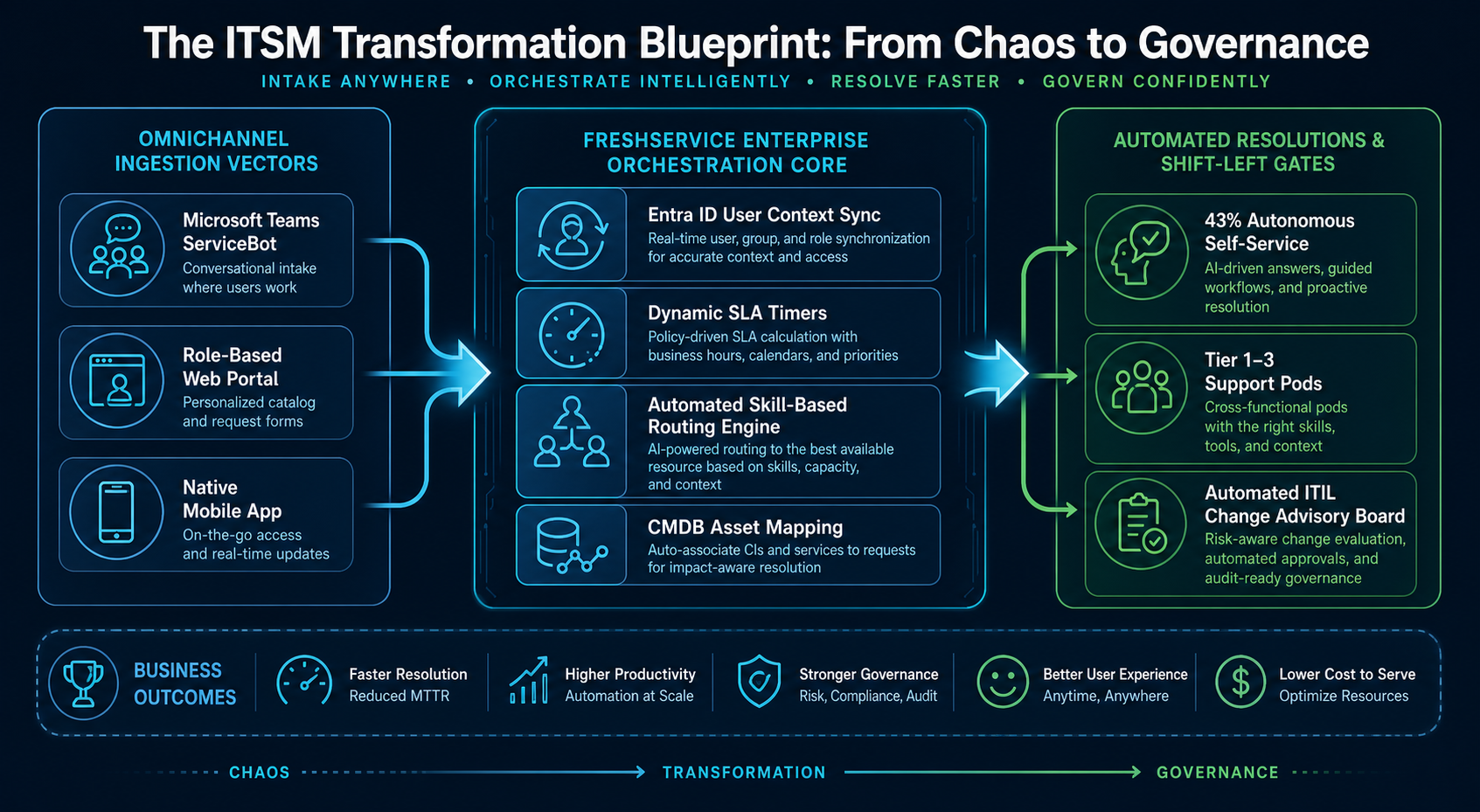
This case study details the comprehensive operational turnaround of a 1,400-employee logistics firm. By dismantling the informal email culture and implementing a governed, ITIL-aligned Freshservice enterprise architecture integrated directly with Microsoft Entra ID and Microsoft Teams, the organization transformed IT from a chaotic cost center into a high-velocity, measurable strategic enabler.
Mean Time to Respond (MTTRp)
Plunged from a legacy baseline of 4.2 hours down to 18 minutes through automated omnichannel orchestration.
Verified SLA Compliance
Maintained across multi-tiered priority matrices (P1 response < 15m; resolution < 4h) with automated escalation triggers.
Tier 1 Shift-Left Deflection
Routine access requests and tier-1 inquiries resolved autonomously without consuming human engineering bandwidth.
Annual Reclaimed Engineering Capacity
Calculated by eliminating technician collision, manual data re-entry, and uncoordinated onboarding handoffs.
1. The Anatomy of the Crisis: The 'Invisible Bleed' of the Shared Mailbox
To understand the transformation, one must first look at the broken baseline. Prior to the turnaround, the organization relied on a single shared mailbox: [email protected redacted for privacy reasons]. On the surface, the IT team appeared busy, closing dozens of issues daily. Beneath the surface, the enterprise was suffering from severe operational dysfunction:
- The Technician Collision Crisis: Without centralized ownership state-locks, multiple technicians routinely spent 45 minutes independently troubleshooting the exact same emailed issue—only discovering the duplicate effort after replying to the user.
- The VIP Blindspot: A desperate email from the Chief Financial Officer regarding a blocked wire transfer sat between a printer-jam notice and a promotional spam newsletter, completely unprioritized for 3 hours.
- Zero Change & Problem Correlation: When a regional warehouse switch went down, the inbox received 180 individual emails from frustrated workers. Technicians treated each email as an isolated event, failing to recognize a single core switch outage until 90 minutes into the disruption.
| Operational Vector | Legacy Shared Mailbox (Broken Baseline) | Modern Freshservice Architecture (Target State) | Strategic Business Impact |
|---|---|---|---|
| Request Ingestion | Raw, unstructured email sent to [email protected redacted for privacy reasons]. | Omnichannel Service Catalog, Microsoft Teams Virtual Agent, Mobile Portal. | Eliminates incomplete ticket triage; 100% structured payload on submission. |
| Ticket Assignment | Manual cherry-picking; technicians avoided difficult network issues. | Automated Skill-Based Round-Robin Dispatch & Workload Balancing. | Eliminates ticket hoarding; workload distributed evenly across pods. |
| User Authentication & Context | Anonymous email strings; technician had to query user location and title manually. | Real-time Microsoft Entra ID SCIM/Graph API sync (Department, Manager, Hub Site). | Zero administrative back-and-forth; immediate technical context. |
| SLA Governance | Subjective promises; zero visibility until business stakeholders escalated angrily. | Dynamic 4-Tier Matrix with visual color-coded breach warnings and SMS alerts. | 98.2% compliance; executive visibility into real-time SLA burn rates. |
| Asset & Lifecycle Linkage | Manual spreadsheets updated once a quarter (always inaccurate). | Integrated Discovery Agent mapping hardware assets and software licenses directly to the user. | Eliminates phantom software costs; automated reclamation during offboarding. |
2. The 90-Day Execution Playbook: Phased Modernization Without Operational Disruption
The critical risk of any ITSM migration is employee rejection. If the new system is perceived as bureaucratic red tape, business users bypass it and revert to private Slack messages or tapping technicians on the shoulder. The modernization was executed in three non-negotiable 30-day phases:
- Phase 1: Identity Synchronization & Intake Clean-Up (Days 1–30):
- Phase 2: Service Catalog Architecture & Orchestration Workflows (Days 31–60):
- Phase 3: Conversational AI & Shift-Left Knowledge Integration (Days 61–90):
3. Deep-Dive Workflow Automation: The Zero-Touch Onboarding Pipeline
The cornerstone of the technical deployment was the automated employee lifecycle pipeline. Previously, onboarding a new warehouse manager required 14 separate emails between HR, Facilities, and IT, taking an average of 4 business days. The automated workflow consolidated this into a zero-touch orchestration routine:
Enterprise Onboarding
Trigger Event: Service Catalog Submission ("New Regional Employee Onboarding")
Pre-Conditions: Submitted by Verified HR Coordinator | Target Start Date >= 72 Hours from Submission
Execution Sequence:
- Step 1 [API Call - Azure Logic Apps]: Query Microsoft Graph API to provision Entra ID account with UPN matching enterprise naming convention.
- Step 2 [Identity Sync]: Assign dynamic Microsoft 365 E5 and ERP Security Groups based on Regional Hub and Department parameters.
- Step 3 [Task Generation - Hardware Pod]: Auto-generate physical staging ticket for Regional IT with pre-allocated asset serial numbers from CMDB.
- Step 4 [Notification Engine]: Dispatch encrypted temporary onboarding envelope via secure SMS to manager's verified mobile number.
- Step 5 [Governance Gate]: Start SLA audit clock (Mandate: 100% operational readiness 24 hours prior to employee start time).
“True operational governance does not slow an organization down; it removes the unseen friction that makes daily work exhausting. When your systems are structured, your engineers can finally stop surviving their days and start engineering their future.”
4. The Business & Financial Verdict
At the six-month post-implementation review, the strategic impact was validated across every tier of the enterprise:
- Executive Visibility: The CIO and Operations Directors now review real-time dashboards detailing ticket volume by site, recurring hardware failure rates, and vendor SLA response times during monthly operational reviews.
- Technician Retention: IT team turnover dropped from 28% annualized to zero in the subsequent 12 months, directly attributed to the elimination of ticket chaos, unmanaged on-call panics, and alert flooding.
- Business Continuity: Infrastructure incidents that previously took 4+ hours to diagnose are now linked automatically to underlying network configuration items in the CMDB, reducing average major incident resolution time to under 42 minutes.
Executive Service Governance Checklist
- Eliminate direct technician email addresses ([email protected redacted for privacy reasons]) from customer-facing channels; enforce governed omnichannel intake.
- Tie service desk categories directly to business-critical assets in your Configuration Management Database (CMDB).
- Implement automated escalation notifications configured to alert managers when tickets reach 75% of their allowable SLA lifecycle.
- Conduct bi-weekly knowledge hygiene reviews to deprecate outdated runbooks and ensure virtual agent accuracy.