Traditional endpoint management is fundamentally incompatible with a distributed, remote-first workforce. When a 2,200-employee healthcare technology enterprise relied on legacy on-premises PXE boot servers, monolithic "golden" disk images, static VPN enrollment, and uniform local administrator passwords across every laptop, device provisioning was painfully slow and dangerously vulnerable: shipping a new laptop took 14 business days, technicians spent four hours per machine on manual driver injection, and a single stolen laptop compromised the local administrator password for the entire enterprise fleet.
This composite case study documents the comprehensive transformation to a modern, cloud-native endpoint architecture. By retiring on-premises imaging infrastructure and implementing Microsoft Intune, Windows Autopilot zero-touch pre-provisioning, automated Cloud Local Administrator Password Solution (Windows LAPS), and dynamic Conditional Access device compliance gates, the organization reduced laptop provisioning time from 4.5 hours to 18 minutes, eliminated uniform local admin risk, and ensured 100% continuous compliance for regulatory audits.
Device Provisioning Time
Dropped from 4.5 hours of manual IT staging down to an 18-minute automated out-of-the-box experience (OOBE) for the user.
Local Admin Password Isolation
Cloud LAPS dynamically generates and rotates high-entropy, unique passwords per device backed by Microsoft Entra ID cryptographic storage.
Continuous Compliance Rate
Automated real-time enforcement of BitLocker 256-bit encryption, Defender EDR signature currency, and OS patch levels via Intune.
Annual IT Shipping & Logistics Savings
Eliminated "depot IT" round-trip hardware shipping by dropshipping sealed OEM laptops directly from the distributor to remote employees.
1. The Broken Baseline: The High Cost of the "Golden Master" Imaging Model
Before the modernization program, the organization's device management practices created an operational bottleneck that frustrated new hires and created serious security vulnerabilities:
- The "Depot IT" Shipping Quagmire: New laptops were shipped from the manufacturer to the IT headquarters, unpacked, manually imaged via USB/PXE boot, repackaged, and shipped to remote employees—adding 10 to 14 days of dead time to onboarding.
- The Monolithic Image Nightmare: The IT desktop team maintained eight distinct 80GB "golden images" to support varying hardware chassis, driver revisions, and departmental software suites, consuming 25% of team bandwidth in constant sysprep patching.
- The Shared Local Administrator Breach Vector: Every workstation shared an identical, hardcoded local administrator password embedded in the original deployment script. A breach of one device gave an attacker administrative lateral control across all 2,200 machines.
| Management Vector | Legacy Imaging Baseline (Broken) | Modern Intune + Autopilot Architecture (Target State) | Strategic Business Impact |
|---|---|---|---|
| Hardware Provisioning | Custom disk wiping and PXE imaging at central IT warehouse (4.5 hours/machine). | Zero-Touch Windows Autopilot; sealed OEM device shipped directly to employee home. | Cuts provisioning time to 18 min; drops onboarding wait time from 14 days to 48 hours. |
| Directory Join Topology | Hybrid domain join dependent on line-of-sight on-premises domain controller / VPN. | 100% Microsoft Entra ID Join with cloud-native Kerberos SSO to legacy internal shares. | Eliminates VPN dependency for onboarding; zero on-premises domain controller footprint. |
| Local Admin Security | Static, universal password across all laptops (`CompanyAdmin2020!`). | Windows Cloud LAPS with automatic rotation after every use and Entra PIM check-out. | Completely neutralizes Pass-the-Hash and lateral privilege escalation attacks. |
| Compliance Enforcement | Periodic vulnerability scans run once a month; non-compliant laptops remain connected. | Real-time Intune Compliance Engine; non-compliant devices blocked instantly at gateway. | Guarantees continuous SOC 2 and HIPAA compliance; zero unencrypted laptop exposure. |
| Software & Patch Distribution | Monolithic SCCM task sequences requiring multi-gigabyte corporate network distribution. | Cloud-native Intune Win32 Apps & Windows Update for Business (WUfB) peer caching. | Eliminates corporate WAN saturation; remote laptops patch seamlessly from Microsoft CDN. |
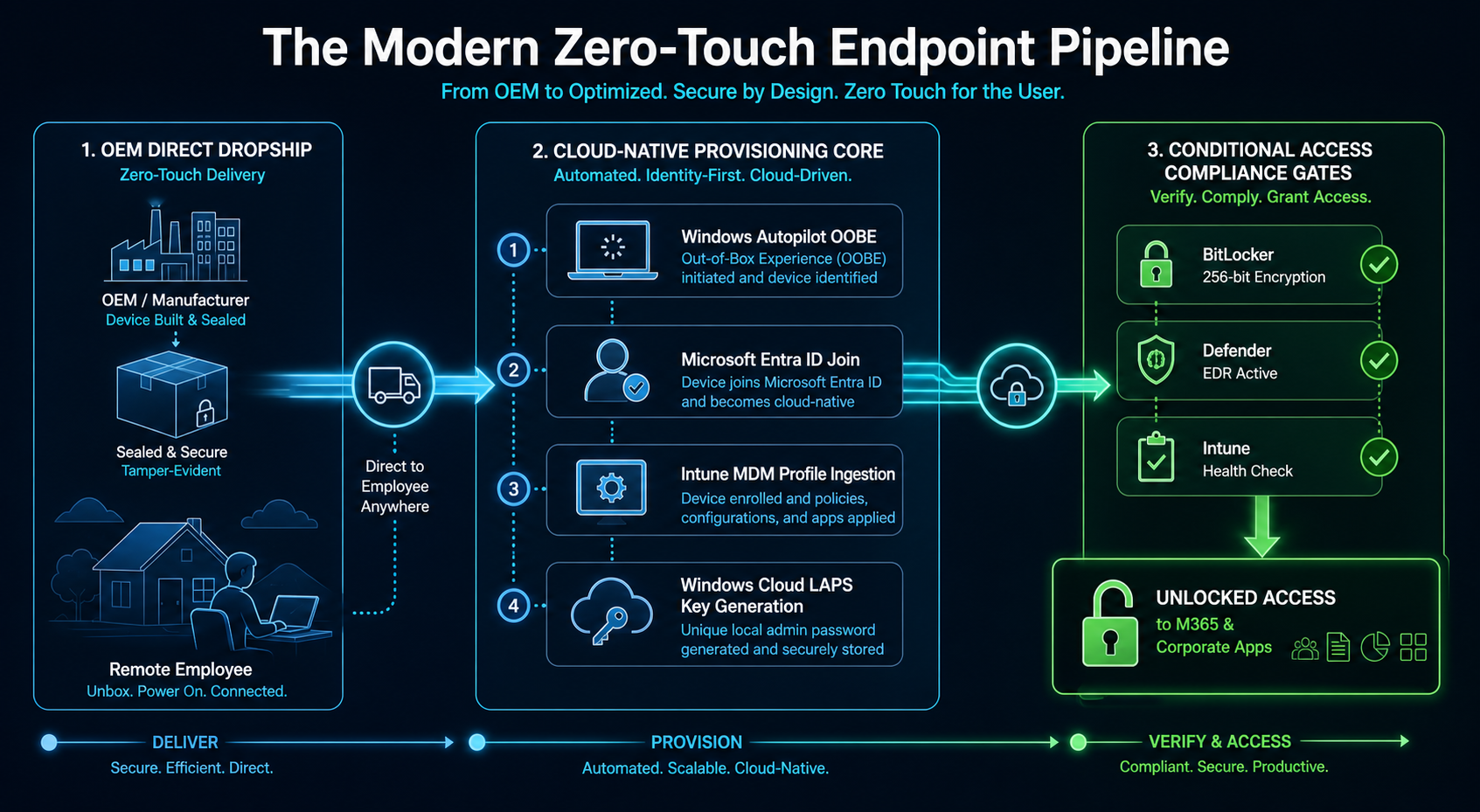
2. The Four-Stage Modern Endpoint Deployment Framework
Transforming 2,200 distributed endpoints without causing widespread operational disruption required an phased, risk-managed modernization roadmap:
- Stage 1: OEM Supply Chain Integration & Hardware Hash Ingestion (Days 1–20):
- Stage 2: Windows Cloud LAPS & Least-Privilege Architecture (Days 21–40):
- Stage 3: Intune Win32 Application Packaging & Configuration Baselines (Days 41–65):
- Stage 4: Windows Update for Business (WUfB) & Compliance Governance (Days 66–90):
3. Deep-Dive Automation: Zero-Touch Autopilot & LAPS Orchestration
The technical engine driving zero-touch provisioning operates through an integrated sequence of identity, policy, and cryptographic key generation:
Autopilot Laps Provisioning Lifecycle
Trigger: Remote Employee Powers On Factory-Sealed Laptop & Connects to Home Wi-Fi
Provisioning Sequence:
  - Step 1 [Autopilot Handshake]: Windows OOBE detects hardware hash -> Downloads corporate branding and Entra tenant enrollment profile.
  - Step 2 [User Authentication]: Employee authenticates with corporate credentials using Microsoft Authenticator number matching.
  - Step 3 [Device Identity]: Endpoint performs Microsoft Entra ID Join -> Ingests cloud management certificates and enrolls in Intune MDM.
  - Step 4 [Security Baseline & Cloud LAPS]:
      * Intune pushes security baseline: Enables BitLocker encryption (silently backs up 48-digit recovery key to Entra ID).
      * Windows Cloud LAPS initializes: Creates unique local administrator account -> Generates random 16-character alphanumeric password -> Escrows encrypted password directly to Entra ID device object.
  - Step 5 [Win32 App Delivery]: Intune Enrollment Status Page (ESP) downloads and installs required core apps (Defender EDR, Office 365 Apps, Teams, GlobalProtect VPN).
  - Step 6 [Compliance Gate Validation]:
      * Intune verifies: BitLocker == Enabled | SecureBoot == Active | Defender Signature == Current.
      * Status marked as "Compliant" in Entra ID -> Conditional Access unlocks corporate SaaS and email services.
“Modern endpoint management is not about building the perfect custom image; it is about building the governance pipeline that dynamically configures any clean, factory-standard machine into a fully secured, compliant corporate asset in minutes.”
4. Operational & Governance Results
At the six-month post-implementation review, the strategic and financial impact of modern device management was confirmed across all operational vectors:
- Zero Staging Backlog: The IT service desk eliminated its continuous 30-laptop staging queue; hardware now routes straight from the OEM to the end user with zero technician touch time.
- Total Lateral Defense: Cloud LAPS deployment completely eliminated static local administrator passwords, cutting lateral attack risk across endpoints to near-zero.
- Effortless Regulatory Audits: Real-time Intune compliance dashboards provided external SOC 2 and HIPAA auditors with instant proof of 100% BitLocker encryption and patch currency without requiring manual spot-check audits.
Modern Endpoint Governance Checklist
- Require hardware vendors to automatically register device hashes directly into your Windows Autopilot tenant upon purchase.
- Eliminate hybrid domain joins for remote workers; adopt cloud-native Microsoft Entra ID Join with Kerberos Cloud Trust.
- Deploy Windows Cloud LAPS immediately to eliminate uniform local administrator passwords across your fleet.
- Block non-compliant devices at the identity perimeter using Microsoft Entra Conditional Access paired with Intune device compliance states.